NETWORKDAYS Function in Google Sheets
Learn how to use NETWORKDAYS in Google Sheets to count business days between dates. Covers holidays, custom weekends with NETWORKDAYS.INTL, and SLA tracking.
Sheets Bootcamp
April 16, 2026
NETWORKDAYS in Google Sheets counts the number of business days between two dates, automatically excluding Saturdays and Sundays. As part of the date functions family, it handles the calculation that manual day-counting gets wrong: skipping weekends, accounting for holidays, and returning clean integer results for SLA tracking, project timelines, and payroll.
This guide covers the NETWORKDAYS syntax, how to exclude holidays, the NETWORKDAYS.INTL variant for custom weekends, and step-by-step examples using an employee database.
In This Guide
- Syntax
- How to Use NETWORKDAYS: Step-by-Step
- Exclude Holidays
- NETWORKDAYS.INTL for Custom Weekends
- Practical Examples
- Common Errors and How to Fix Them
- Tips and Best Practices
- Related Google Sheets Tutorials
- Frequently Asked Questions
Syntax
=NETWORKDAYS(start_date, end_date, [holidays])| Parameter | Description | Required |
|---|---|---|
| start_date | The beginning date | Yes |
| end_date | The ending date | Yes |
| holidays | A range or array of dates to exclude (in addition to weekends) | No |
NETWORKDAYS includes both the start and end dates in the count. If start_date is after end_date, the result is negative.
NETWORKDAYS counts both the start date and the end date. If the start is Monday and the end is Friday of the same week, the result is 5, not 4. This matches how most payroll and SLA systems count working days.
How to Use NETWORKDAYS: Step-by-Step
We’ll use the employee database with 8 employees. The table has Name in column A, Employee ID in column B, Department in column C, and Hire Date in column D.
Sample Data
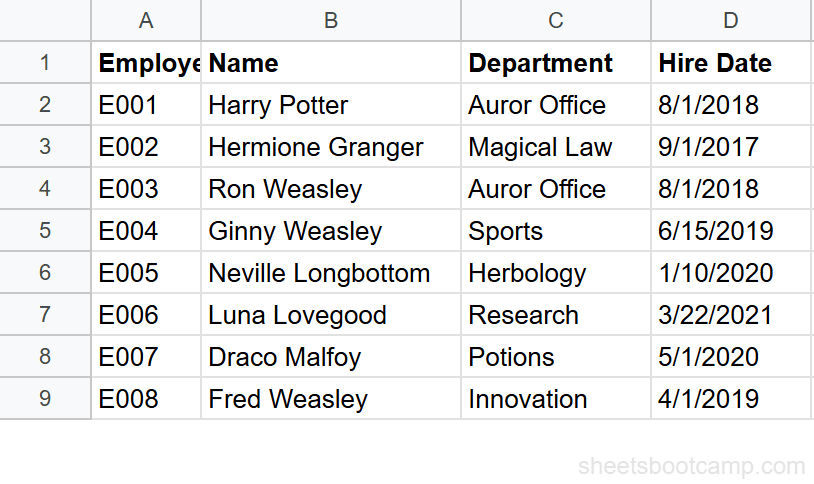
Review your employee data
Open the spreadsheet. Column D has Hire Dates ranging from 9/1/2017 (Hermione Granger) to 3/22/2021 (Luna Lovegood). You’ll calculate the number of business days each employee has worked through today’s date.
Count business days of tenure
Select cell F2 and enter:
=NETWORKDAYS(D2, TODAY())For Harry Potter (hired 8/1/2018), this returns approximately 2,020 business days as of early 2026. The exact number changes daily because TODAY() updates automatically. Copy the formula down to F9 for all employees.
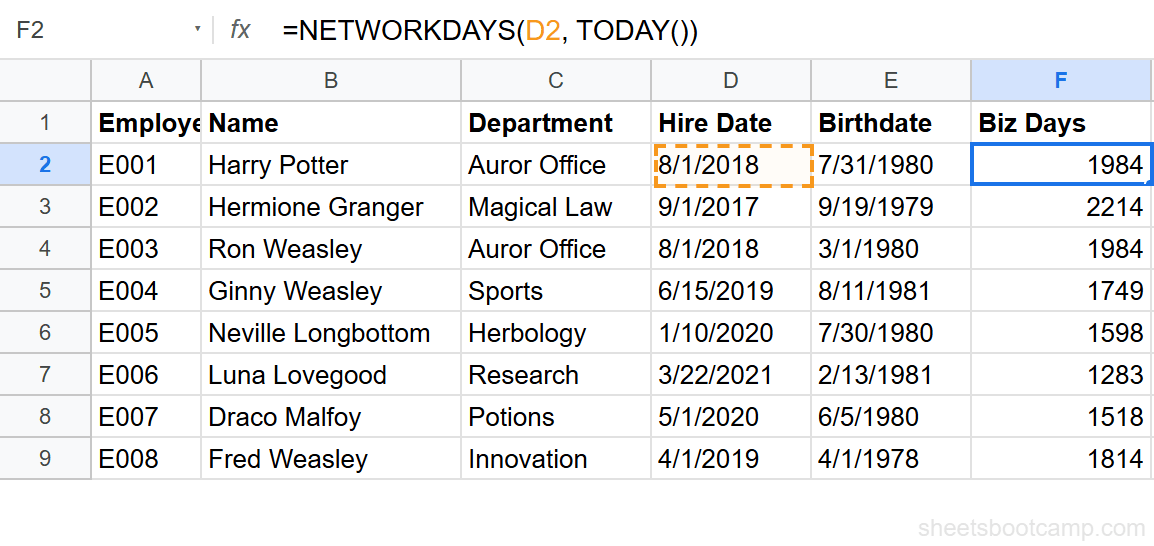
Compare this to DATEDIF, which counts calendar days. Harry Potter’s calendar day count would be around 2,828, but only about 2,020 of those are business days.
Add a holiday list
Create a list of holiday dates in a separate column (for example, J2:J10). Common US holidays might include 1/1/2026, 1/19/2026, 2/16/2026, 5/25/2026, 7/4/2026, and 12/25/2026.
Update the formula:
=NETWORKDAYS(D2, TODAY(), $J$2:$J$10)The holiday dates are excluded from the business day count. Use absolute references ($J$2:$J$10) so the range stays fixed when you copy the formula down.
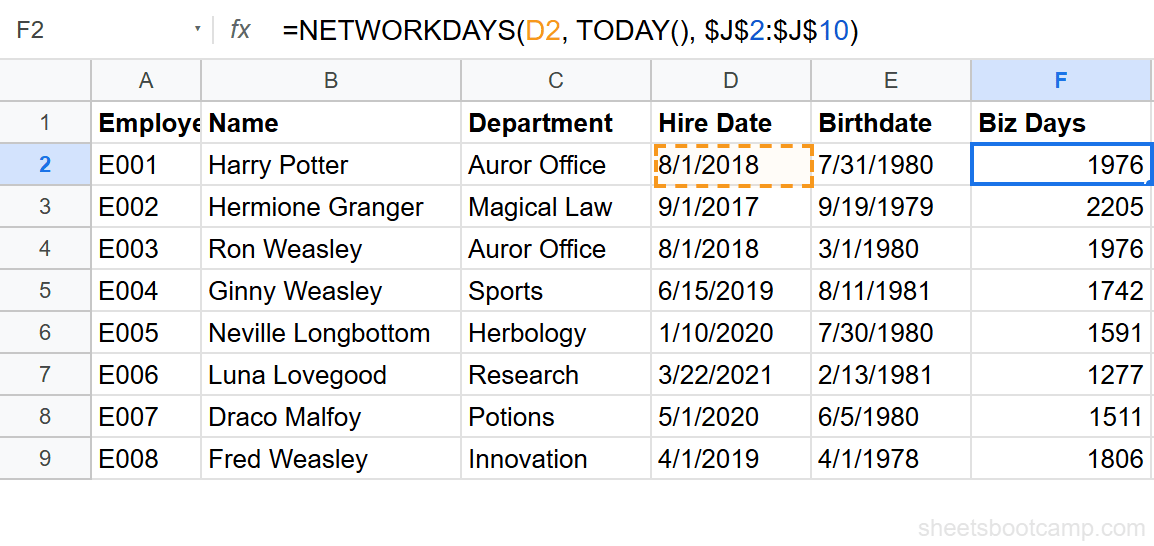
Keep your holiday list on a separate sheet named “Holidays.” Reference it as Holidays!A:A in the formula. This keeps the main data clean and makes the holiday list reusable across formulas.
Use NETWORKDAYS.INTL for custom weekends
Some departments work non-standard schedules. NETWORKDAYS.INTL lets you define which days count as weekends.
=NETWORKDAYS.INTL(D2, TODAY(), 7)Weekend type 7 treats Friday and Saturday as the weekend (work week is Sunday through Thursday). For departments that work Tuesday through Saturday, use type 2 (Sunday and Monday off).
Exclude Holidays
The third argument accepts a range of cells containing dates. Each date in the range is treated as a non-working day, in addition to weekends.
=NETWORKDAYS("1/1/2026", "12/31/2026", J2:J10)This counts business days in 2026, minus any dates listed in J2:J10. The holiday dates do not need to be sorted. Duplicate dates are counted once.
You can also use an array literal:
=NETWORKDAYS("1/1/2026", "12/31/2026", {"1/1/2026","7/4/2026","12/25/2026"})This hardcodes three holidays. The range approach is more maintainable for real-world use.
NETWORKDAYS.INTL for Custom Weekends
NETWORKDAYS.INTL adds a weekend parameter between start_date and end_date.
=NETWORKDAYS.INTL(start_date, end_date, [weekend], [holidays])| Parameter | Description | Required |
|---|---|---|
| start_date | The beginning date | Yes |
| end_date | The ending date | Yes |
| weekend | A number (1-7) or 7-character string defining weekend days | No (default: 1) |
| holidays | Dates to exclude | No |
Weekend Type Numbers
| Type | Weekend Days | Work Week |
|---|---|---|
| 1 | Saturday, Sunday | Mon–Fri (default) |
| 2 | Sunday, Monday | Tue–Sat |
| 3 | Monday, Tuesday | Wed–Sun |
| 7 | Friday, Saturday | Sun–Thu |
| 11 | Sunday only | Mon–Sat |
| 12 | Monday only | Tue–Sun |
For a 7-character string, use 1 for weekend and 0 for workday, starting with Monday. "0000011" means Saturday and Sunday are weekends (same as type 1). "0000010" means only Saturday is a weekend.
NETWORKDAYS (without .INTL) always uses Saturday and Sunday as weekends. If your team works a standard Monday–Friday schedule, the basic NETWORKDAYS is all you need. Use .INTL only when the weekend days differ.
Practical Examples
Project Timeline: Business Days to Deadline
You have a project start date in A2 and a deadline in B2. Count the working days available:
=NETWORKDAYS(A2, B2)For a project starting 4/1/2026 with a deadline of 5/15/2026, this returns 33 business days. Subtract holidays to get the actual available working days.
SLA Compliance Check
Check whether a support ticket was resolved within 5 business days. Column A has the open date, column B has the resolved date:
=IF(NETWORKDAYS(A2, B2) <= 5, "Within SLA", "Breached")This uses IF to label each ticket. A ticket opened on Monday and resolved the following Monday counts as 6 business days (both dates included), which breaches a 5-day SLA.
Workdays Remaining This Month
Count business days left in the current month:
=NETWORKDAYS(TODAY(), EOMONTH(TODAY(), 0))This uses TODAY() and EOMONTH together. On April 10, 2026 (a Friday), this counts the business days from today through April 30, 2026.
Common Errors and How to Fix Them
#VALUE! Error
NETWORKDAYS returns #VALUE! when one of the date arguments is text instead of a real date. This often happens with imported data.
Fix: Test with =ISNUMBER(D2). If FALSE, the value is text. Convert it with =DATEVALUE(D2).
Negative Result
NETWORKDAYS returns a negative number when the start date is after the end date.
Fix: Swap the arguments, or use =ABS(NETWORKDAYS(A2, B2)) if you only need the magnitude.
Holidays Not Being Excluded
You added a holidays range but the count doesn’t change. The holiday dates might be text strings instead of real dates.
Fix: Check each holiday cell with =ISNUMBER(). Text dates are invisible to NETWORKDAYS. Re-enter them as dates or convert with DATEVALUE.
Tips and Best Practices
-
Use absolute references for the holiday range. When copying NETWORKDAYS formulas down a column, lock the holiday range with
$signs:$J$2:$J$10. Otherwise each row references a different range. -
Pair with TODAY() for live countdowns.
=NETWORKDAYS(TODAY(), B2)gives you the business days remaining until a deadline, updated daily. -
Store holidays on a dedicated sheet. Keep a “Holidays” sheet with one column of dates. Reference it as
Holidays!A:Ain every NETWORKDAYS formula across the workbook. -
Use NETWORKDAYS.INTL with a string for partial weekends. If only Sunday is a day off, use
"0000001"as the weekend argument. This is more flexible than the numbered types. -
Combine with conditional formatting for visual SLA tracking. Highlight cells where
NETWORKDAYS(open_date, close_date) > 5to flag breached SLAs at a glance.
Related Google Sheets Tutorials
- Google Sheets Date Functions: The Complete Guide — Full reference covering NETWORKDAYS, DATEDIF, TODAY, EDATE, and more
- TODAY and NOW Functions — Auto-updating dates for countdowns and live calculations
- DATEDIF Function Guide — Calculate calendar day differences between dates
- EDATE and EOMONTH Functions — Add months to dates and find end-of-month dates
- COUNTIF and COUNTIFS — Count records that meet date-based conditions
Frequently Asked Questions
What does NETWORKDAYS do in Google Sheets?
NETWORKDAYS counts the number of business days (Monday through Friday) between two dates. It automatically excludes weekends. You can also provide a list of holiday dates to exclude from the count.
How do I count business days between two dates in Google Sheets?
Use =NETWORKDAYS(start_date, end_date). For example, =NETWORKDAYS("1/1/2026", "1/31/2026") returns 22, the number of weekdays in January 2026. Add a third argument with a range of holiday dates to exclude those as well.
What is the difference between NETWORKDAYS and NETWORKDAYS.INTL?
NETWORKDAYS treats Saturday and Sunday as weekends. NETWORKDAYS.INTL lets you define which days are weekends using a weekend type number. For example, weekend type 2 treats Sunday and Monday as the weekend instead of Saturday and Sunday.
Does NETWORKDAYS include the start and end dates?
Yes. NETWORKDAYS counts both the start date and the end date if they fall on business days. If the start date is Monday January 5 and the end date is Friday January 9, the result is 5.
How do I exclude holidays from NETWORKDAYS?
Add a third argument with a range of holiday dates. =NETWORKDAYS(A2, B2, E2:E10) counts business days between A2 and B2, excluding any dates listed in E2:E10. The holiday dates can be in any order.