QUERY ORDER BY in Google Sheets (Sort Results)
Learn how to use QUERY ORDER BY in Google Sheets to sort results by one or multiple columns, ascending or descending. Step-by-step examples.
Sheets Bootcamp
April 30, 2026
QUERY ORDER BY in Google Sheets sorts the rows returned by your QUERY function in ascending or descending order. It works on text, numbers, and dates, and you can sort by multiple columns at once. We’ll cover the syntax, single and multi-column sorting, and how ORDER BY combines with WHERE and GROUP BY.
In This Guide
- ORDER BY Syntax
- How to Sort QUERY Results: Step-by-Step
- Sort Descending with DESC
- Sort by Multiple Columns
- ORDER BY with WHERE
- ORDER BY with GROUP BY
- Sort by Date
- Common Mistakes
- Tips
- Related Google Sheets Tutorials
- FAQ
ORDER BY Syntax
ORDER BY goes at the end of the query string (before LIMIT, if used):
=QUERY(data, "SELECT columns ORDER BY column ASC|DESC")| Keyword | Meaning | Example |
|---|---|---|
ASC | Ascending (A-Z, 0-9, oldest to newest) | ORDER BY F ASC |
DESC | Descending (Z-A, 9-0, newest to oldest) | ORDER BY F DESC |
ASC is the default. If you omit ASC or DESC, QUERY sorts ascending. ORDER BY F and ORDER BY F ASC produce the same result.
How to Sort QUERY Results: Step-by-Step
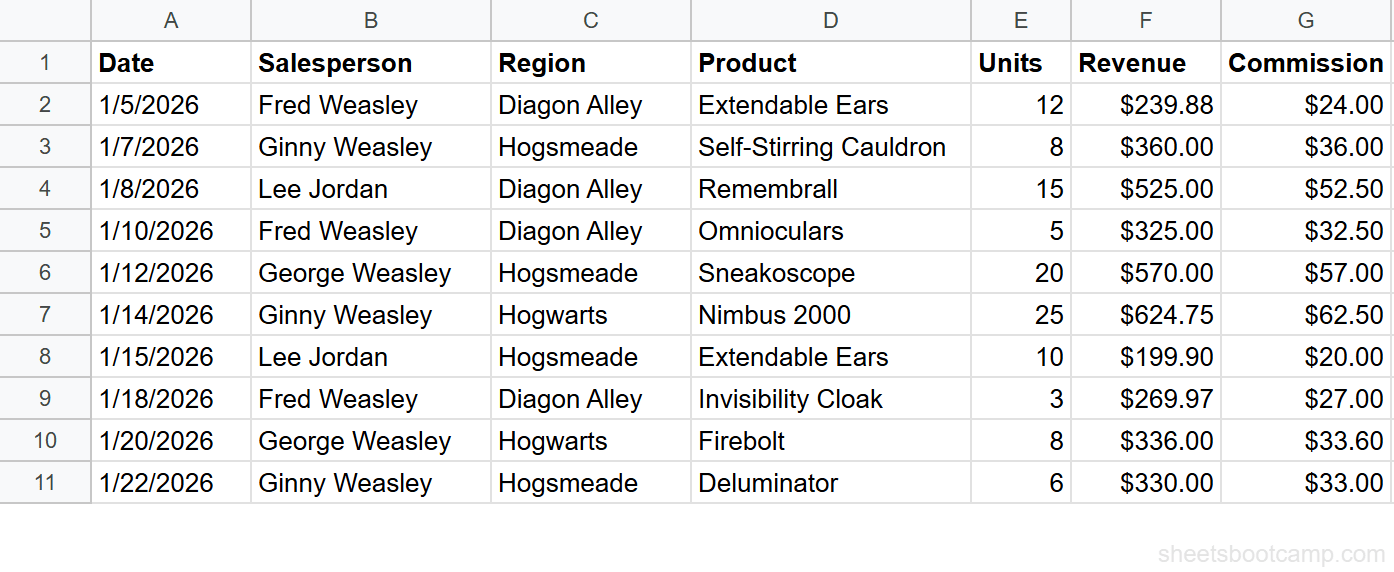
We’ll use the same sales records table from the QUERY guide. The data is in A1:G11 with 10 transactions.
Sample Data
| A | B | C | D | E | F | G | |
|---|---|---|---|---|---|---|---|
| 1 | Date | Salesperson | Region | Product | Units | Revenue | Commission |
| 2 | 1/5/2026 | Fred Weasley | Diagon Alley | Extendable Ears | 12 | $239.88 | $24.00 |
| 3 | 1/7/2026 | Ginny Weasley | Hogsmeade | Self-Stirring Cauldron | 8 | $360.00 | $36.00 |
| 4 | 1/8/2026 | Lee Jordan | Diagon Alley | Remembrall | 15 | $525.00 | $52.50 |
| 5 | 1/10/2026 | Fred Weasley | Diagon Alley | Omnioculars | 5 | $325.00 | $32.50 |
| 6 | 1/12/2026 | George Weasley | Hogsmeade | Sneakoscope | 20 | $570.00 | $57.00 |
| 7 | 1/14/2026 | Ginny Weasley | Hogwarts | Nimbus 2000 | 25 | $624.75 | $62.50 |
| 8 | 1/15/2026 | Lee Jordan | Hogsmeade | Extendable Ears | 10 | $199.90 | $20.00 |
| 9 | 1/18/2026 | Fred Weasley | Diagon Alley | Invisibility Cloak | 3 | $269.97 | $27.00 |
| 10 | 1/20/2026 | George Weasley | Hogwarts | Firebolt | 8 | $336.00 | $33.60 |
| 11 | 1/22/2026 | Ginny Weasley | Hogsmeade | Deluminator | 6 | $330.00 | $33.00 |
Review your data range
Your data lives in A1:G11. Row 1 is the header. Columns are Date (A), Salesperson (B), Region (C), Product (D), Units (E), Revenue (F), and Commission (G).
Sort by one column ascending
Select an empty cell and enter:
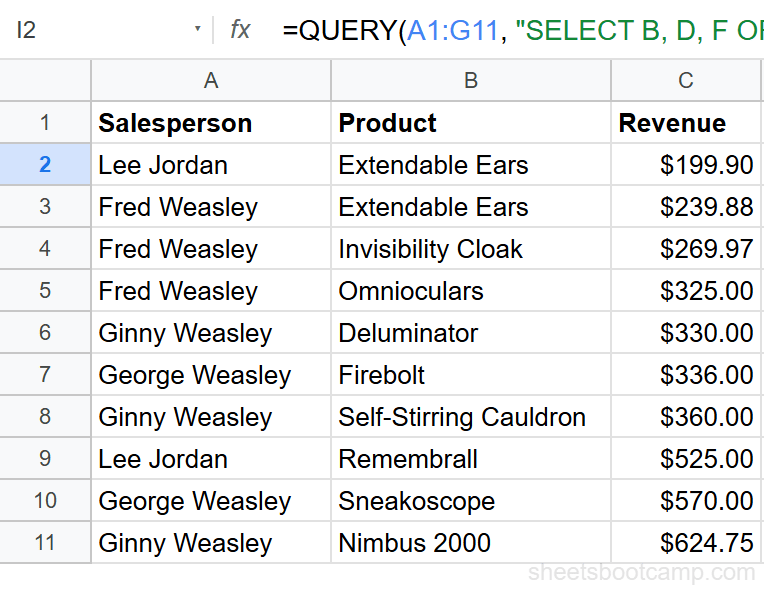
=QUERY(A1:G11, "SELECT B, D, F ORDER BY F ASC")This returns Salesperson, Product, and Revenue sorted from lowest to highest revenue. Lee Jordan’s Extendable Ears ($199.90) appears first, and Ginny Weasley’s Nimbus 2000 ($624.75) appears last.
Sort by one column descending
Change ASC to DESC:
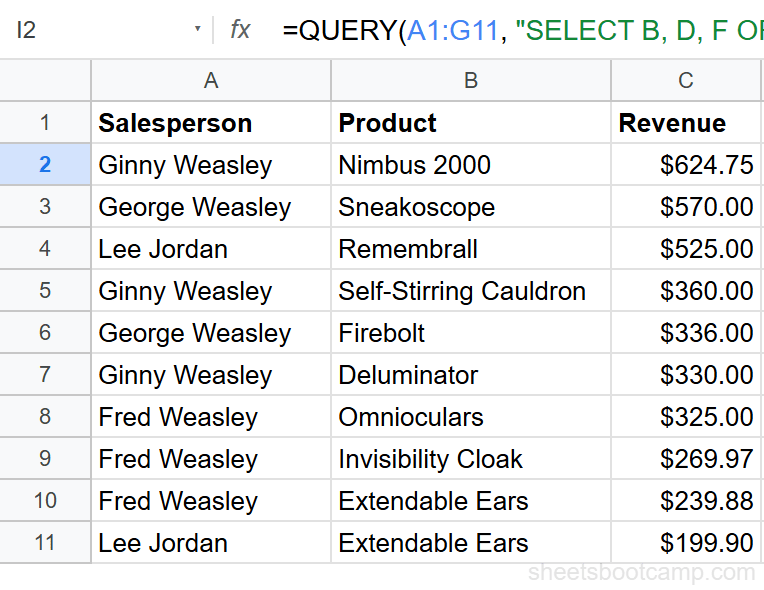
=QUERY(A1:G11, "SELECT B, D, F ORDER BY F DESC")Now the highest revenue appears first. Ginny Weasley’s Nimbus 2000 ($624.75) is row 1, and Lee Jordan’s Extendable Ears ($199.90) is last.
Sort by multiple columns
Enter:
=QUERY(A1:G11, "SELECT C, B, F ORDER BY C ASC, F DESC")This sorts by Region alphabetically first. Within each region, rows are sorted by Revenue from highest to lowest. Diagon Alley’s top transaction (Lee Jordan, $525.00) appears before Diagon Alley’s lowest (Fred Weasley, $239.88).
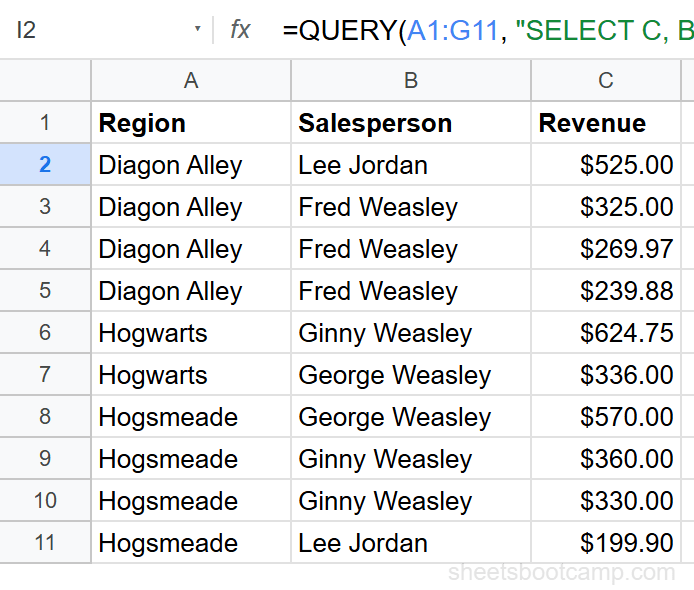
Multi-column sorting is useful for reports. Sort by category first, then by amount within each category, to make the data scannable.
Sort Descending with DESC
DESC reverses the sort order. For numbers, it sorts largest to smallest. For text, Z to A. For dates, newest to oldest.
=QUERY(A1:G11, "SELECT B, E ORDER BY E DESC")This returns Salesperson and Units sorted by Units descending. Ginny Weasley’s 25-unit transaction appears first.
Sort by Multiple Columns
Separate columns with commas. Each column can have its own sort direction:
=QUERY(A1:G11, "SELECT B, C, F ORDER BY B ASC, F DESC")This sorts alphabetically by Salesperson. Fred Weasley’s rows appear first (because F comes before G, G, and L). Within Fred’s rows, the highest revenue transaction appears at the top.
You can sort by as many columns as you need. The first column takes priority, then the second breaks ties, and so on.
ORDER BY with WHERE
WHERE filters rows. ORDER BY sorts whatever WHERE returns.
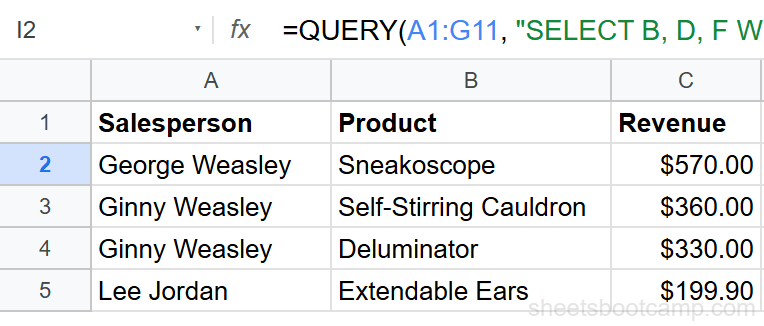
=QUERY(A1:G11, "SELECT B, D, F WHERE C = 'Hogsmeade' ORDER BY F DESC")This returns only Hogsmeade transactions, sorted by Revenue descending. George Weasley’s Sneakoscope ($570.00) appears first, followed by Ginny Weasley’s Self-Stirring Cauldron ($360.00), Ginny Weasley’s Deluminator ($330.00), and Lee Jordan’s Extendable Ears ($199.90).
Clause order matters. WHERE must come before ORDER BY in the query string. Writing ORDER BY F DESC WHERE C = 'Hogsmeade' causes an error.
ORDER BY with GROUP BY
When you aggregate data with GROUP BY, ORDER BY sorts the grouped results:
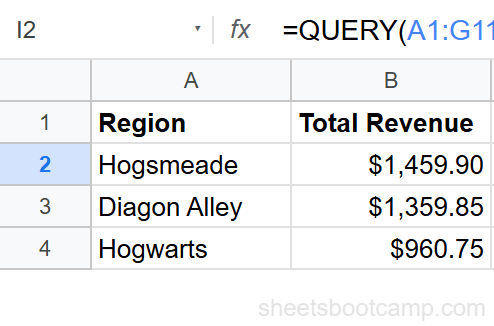
=QUERY(A1:G11, "SELECT C, SUM(F) GROUP BY C ORDER BY SUM(F) DESC LABEL SUM(F) 'Total Revenue'")This groups revenue by region, then sorts so the highest-revenue region appears first. Hogsmeade ($1,459.90) tops the list, followed by Diagon Alley ($1,359.85) and Hogwarts ($960.75).
To sort grouped results by the grouped column instead:
=QUERY(A1:G11, "SELECT C, SUM(F) GROUP BY C ORDER BY C ASC LABEL SUM(F) 'Total Revenue'")This sorts regions alphabetically: Diagon Alley, Hogwarts, Hogsmeade.
Sort by Date
ORDER BY handles dates natively. No special syntax needed — the column’s data type determines how QUERY sorts:
=QUERY(A1:G11, "SELECT A, B, F ORDER BY A DESC")This sorts transactions by date from newest to oldest. The 1/22/2026 transaction appears first, and the 1/5/2026 transaction appears last.
To get the most recent 3 transactions, combine ORDER BY DESC with LIMIT:
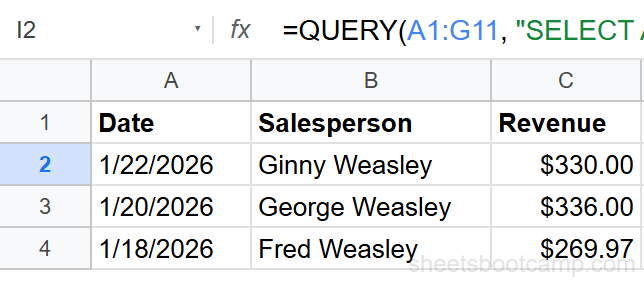
=QUERY(A1:G11, "SELECT A, B, F ORDER BY A DESC LIMIT 3")This returns only the 3 most recent transactions: 1/22/2026 (Ginny Weasley, $330.00), 1/20/2026 (George Weasley, $336.00), and 1/18/2026 (Fred Weasley, $269.97).
Common Mistakes
Putting ORDER BY before WHERE
The clause order in QUERY is fixed: SELECT, WHERE, GROUP BY, PIVOT, ORDER BY, LIMIT, OFFSET, LABEL, FORMAT. Writing ORDER BY before WHERE causes a parse error.
Sorting by a column not in SELECT
ORDER BY can reference any column in the data range, even if it is not in the SELECT list. This is valid: SELECT B, F ORDER BY C. QUERY sorts by column C internally but only returns columns B and F.
Using column names instead of letters
QUERY uses column letters from the data range, not header names. ORDER BY Revenue causes an error. Use ORDER BY F instead.
Forgetting the comma between multiple sort columns
ORDER BY C F causes an error. Multiple columns need commas: ORDER BY C, F.
Tips
1. Combine ORDER BY with LIMIT for top-N reports. ORDER BY F DESC LIMIT 5 returns the 5 highest-revenue transactions. This is one of the most common QUERY patterns.
2. Sort aggregated columns in GROUP BY. You can ORDER BY an aggregate like SUM(F) or COUNT(F) after GROUP BY. The aggregate expression in ORDER BY must match the one in SELECT exactly.
3. Use ORDER BY with WHERE to build filtered, sorted reports in a single formula. No helper columns or manual sorting needed.
ORDER BY runs after WHERE and GROUP BY. If your WHERE clause eliminates rows you expected to see in the sorted result, check your filter conditions first.
Related Google Sheets Tutorials
- QUERY Function: Complete Guide — covers all QUERY clauses with syntax and examples
- QUERY WHERE Clause — filter rows before sorting with WHERE conditions
- QUERY GROUP BY — aggregate data with SUM, COUNT, and AVG then sort the summary
- QUERY PIVOT — create cross-tabulated reports from your data
Frequently Asked Questions
How do you sort QUERY results in Google Sheets?
Add ORDER BY to your query string. For example, =QUERY(A1:G11, "SELECT * ORDER BY F DESC") sorts all rows by the Revenue column from highest to lowest. Use ASC for ascending or DESC for descending.
Can you sort by multiple columns in QUERY?
Yes. List the columns separated by commas: ORDER BY C ASC, F DESC. This sorts by Region alphabetically first, then by Revenue descending within each region.
What is the default sort order in QUERY ORDER BY?
The default is ascending (ASC). If you write ORDER BY F without specifying ASC or DESC, QUERY sorts from smallest to largest for numbers and A to Z for text.
Can you combine ORDER BY with WHERE and GROUP BY?
Yes. Clauses go in this order: SELECT, WHERE, GROUP BY, ORDER BY, LIMIT. For example: SELECT C, SUM(F) WHERE F > 200 GROUP BY C ORDER BY SUM(F) DESC.
Does QUERY ORDER BY sort dates correctly?
Yes. QUERY recognizes date columns and sorts them chronologically. ORDER BY A ASC sorts from earliest to latest date. ORDER BY A DESC sorts from most recent to oldest.