
This free Google Sheets habit tracker gives you 10 habits, a checkbox for every day of the month, and automatic counts for days done, progress toward your goal, your current streak, and your best streak. Make a copy, type your habits into the gold cells, and tick a box each day.
beginner 2 min read
Free Google Sheets Habit Tracker Template (With Streaks)
A free Google Sheets habit tracker: tick a checkbox each day and it counts days done, progress toward your goal, and your current and best streak.
SB
Sheets Bootcamp
September 30, 2026
Table of Contents
Quick Answer
Free Habit Tracker for Google Sheets
10 habits, one checkbox per day, streaks and progress bars. Formulas only, no add-ons.
Make a copy of the Habit TrackerFree. No email, no sign-up. Google asks you to press "Make a copy", and the copy lives in your own Drive.
Want to build files like this yourself? The Sheets Bootcamp teaches every formula in it. Get the Bootcamp for $29
What the Habit Tracker Does
Every habit gets a row. Every day of the month gets a checkbox. As you tick boxes, five numbers keep themselves up to date on the right:
| Column | What it shows |
|---|---|
| Done | How many days you’ve ticked this month |
| % of goal | Days done divided by your goal |
| Progress | The same thing as a bar, so you can scan it |
| Streak | Your current run of ticked days, ending today |
| Best | Your longest run anywhere in the month |
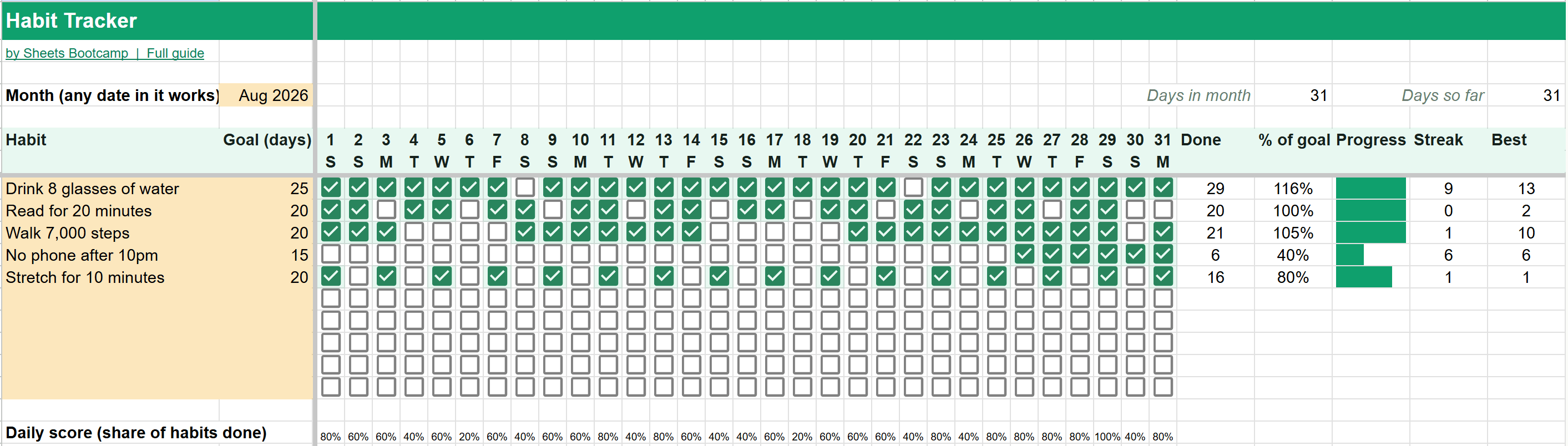
Along the bottom, a daily score shows what share of your habits you did each day, so you can spot the days that slip.
How to Use It
1
Make a copy
Press the button above, then Make a copy. The copy lands in your Drive and nobody else can see it.
2
Pick the month
Type any date in the month you want into B4. The day numbers and weekday letters change to match. In a 30-day month, day 31 goes blank.
3
Add your habits and goals
Replace the five sample habits in column A with your own, up to 10. In column B, set a goal in days per month. A daily habit might be 25. Something you want to do three times a week might be 12.
4
Tick a box each day
Check the box under the date for every habit you did. That’s the only thing you do day to day. The counts, bars and streaks update as you tick.
5
Start the next month
Right-click the Habits tab and choose Duplicate. On the copy, change the month in B4 and clear the ticks. Each month keeps its own tab, so your history stays.
How the Streaks Work
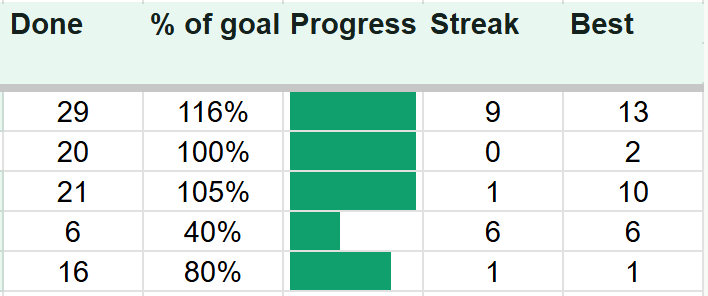
Best is the longest run of ticked days anywhere in the month. In the example, the water habit was done 29 days out of 31, with one 13-day run in the middle.
Streak is the run that ends today. Two details make it behave the way you’d expect:
- It doesn’t reset before you’ve had a chance to tick today. If today’s box is empty, the streak counts up to yesterday. Tick today and it goes up by one.
- For a past month, “today” is the last day of that month. So an old month’s tab shows the streak it ended on.
In the example, “No phone after 10pm” was only done 6 days, but they were the last 6, so its current streak is 6.
Tip
Progress can go above 100%. If your goal is 20 days and you did 21, it shows 105% and a full bar. Set goals you can beat, then raise them next month.
The Formulas Inside
The template’s How it works tab shows every formula in plain language. The two worth knowing:
Days done counts the ticked checkboxes in a row. A ticked checkbox is TRUE:
Formula
=COUNTIF(C8:AG8, TRUE) Best streak turns the row into a string of 1s and 0s, cuts it at every 0, and measures the longest piece:
Formula
=MAX(ARRAYFORMULA(LEN(SPLIT(JOIN("",ARRAYFORMULA(IF(C8:AG8=TRUE,"1","0"))),"0")))) If you want to understand pieces like these, see COUNTIF, checkboxes and ARRAYFORMULA.
Frequently Asked Questions
Is this Google Sheets habit tracker free?
Yes. It's free with no email or sign-up. Press Make a copy and it goes into your own Google Drive.
How many habits can I track?
Up to 10 habits per month. Each one gets its own goal, and rows you leave empty stay blank.
How does the streak work?
Streak is the run of ticked days ending today. It doesn't reset just because you haven't ticked today yet: one unticked day at the very end is allowed. Best is the longest run anywhere in the month.
How do I start a new month?
Right-click the Habits tab, choose Duplicate, then type the new month into B4 on the copy and clear the ticks. Each month keeps its own tab, so your history stays.
Can I set a goal of fewer than every day?
Yes. The goal is days per month, so a habit you want to do three times a week can have a goal of 12. Progress is days done divided by that goal, and it can go above 100%.
You've googled this formula before. Probably more than once.
The Bootcamp is a real Google Sheet that grades every formula the moment you press Enter. 193 exercises across 9 modules, the 10% of Sheets that does 90% of the work. One payment of $29.
Get It for $29 Get the Bootcamp for $2930-day refund. Reply to any email and you get your money back.
Not ready to pay? Try Basic Training free →