
This free Google Sheets student data tracker is a gradebook for up to 40 students and 8 assessments that calculates each student’s points, percent, letter grade and missing work, plus a class average for every assessment. Blank scores count as missing, not as zero, so one late assignment doesn’t wreck a grade.
beginner 2 min read
Free Student Data Tracker for Google Sheets (Gradebook)
A free Google Sheets student data tracker: scores for 40 students and 8 assessments, automatic percent and letter grade, missing work, and class averages.
SB
Sheets Bootcamp
September 30, 2026
Table of Contents
Quick Answer
Free Student Data Tracker for Google Sheets
40 students, 8 assessments, letter grades from your own scale. Formulas only, no add-ons.
Make a copy of the Student Data TrackerFree. No email, no sign-up. Google asks you to press "Make a copy", and the copy lives in your own Drive.
Want to build files like this yourself? The Sheets Bootcamp teaches every formula in it. Get the Bootcamp for $29
What’s Inside
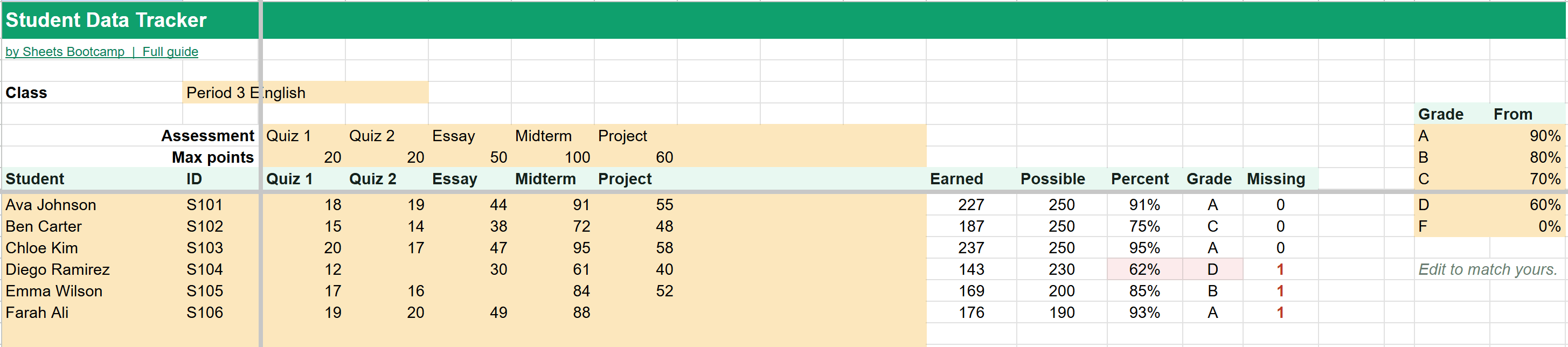
You type the gold cells: the class name, assessment names and their point values, student names and IDs, and scores. Five columns on the right fill themselves in:
| Column | What it shows |
|---|---|
| Earned | Total points the student has scored |
| Possible | Total points available on the work they’ve done |
| Percent | Earned divided by possible |
| Grade | The letter grade from your scale |
| Missing | How many named assessments have no score yet |
Percents under 70% are highlighted, and any missing work shows in red, so the students who need attention stand out.
Missing Work Doesn’t Count as Zero
The gradebook treats a blank score as “not in yet,” not “earned nothing.” The blank is left out of Possible, and Missing counts it.
In the example, Diego skipped Quiz 2. His 143 points are out of the 230 points on work he did, which is 62%, a D, with 1 missing. If you want a missing assignment to count as zero, type 0 instead of leaving it blank.
Letter Grades and the Scale
The scale sits to the right of the gradebook:
| Grade | From |
|---|---|
| A | 90% |
| B | 80% |
| C | 70% |
| D | 60% |
| F | 0% |
Change any cutoff to match your school’s, and every letter grade updates. In the example, Emma’s 169 out of 200 points is 85%, a B.
Class Averages
Under each assessment, the Class average row shows the average score as a percent of its point value. Quiz 1 averaged 84% in the example. It’s a quick way to spot an assessment that was too hard, or a topic the whole class needs to revisit.
The Formulas Inside
The How it works tab explains every formula. Points possible uses SUMPRODUCT to add up the point values only for assessments the student has a score in:
Formula
=SUMPRODUCT((C9:J9<>"")*($C$7:$J$7)) The letter grade is a nested IF that checks the percent against the scale from the top down. To learn how these work, see nested IF statements, IFS and average functions.
Frequently Asked Questions
Is this student data tracker free?
Yes. It's free with no email or sign-up. Press Make a copy and it goes into your own Google Drive.
How are missing assignments handled?
A blank score is left out of the percent rather than counted as zero, and the Missing column counts it. Type 0 if the student turned it in and earned nothing. In the example, Diego is missing one quiz and has 62% on the 230 points he completed.
Can I change the letter grade scale?
Yes. The scale sits to the right of the gradebook: A from 90%, B from 80%, C from 70%, D from 60%. Change any cutoff and every letter grade updates.
Are assessments weighted?
They're weighted by points. A 100-point midterm counts five times as much as a 20-point quiz, because the percent is total points earned over total points possible.
How many students and assessments fit?
40 students and 8 assessments per tab. For another class, right-click the tab and choose Duplicate.
You've googled this formula before. Probably more than once.
The Bootcamp is a real Google Sheet that grades every formula the moment you press Enter. 193 exercises across 9 modules, the 10% of Sheets that does 90% of the work. One payment of $29.
Get It for $29 Get the Bootcamp for $2930-day refund. Reply to any email and you get your money back.
Not ready to pay? Try Basic Training free →