
This free Google Sheets assignment tracker puts every class and due date in one list, counts down the days left, shows overdue work in red, and averages your grades. A Summary tab shows how many assignments are overdue and how many are due in the next 7 days.
beginner 2 min read
Free Google Sheets Assignment Tracker Template
A free Google Sheets assignment tracker: every class and due date in one list, days left, overdue work in red, status, priority and your average grade.
SB
Sheets Bootcamp
September 30, 2026
Table of Contents
Quick Answer
Free Assignment Tracker for Google Sheets
Due dates with days left, overdue in red, status, priority and grades. Formulas only, no add-ons.
Make a copy of the Assignment TrackerFree. No email, no sign-up. Google asks you to press "Make a copy", and the copy lives in your own Drive.
Want to build files like this yourself? The Sheets Bootcamp teaches every formula in it. Get the Bootcamp for $29
What’s Inside
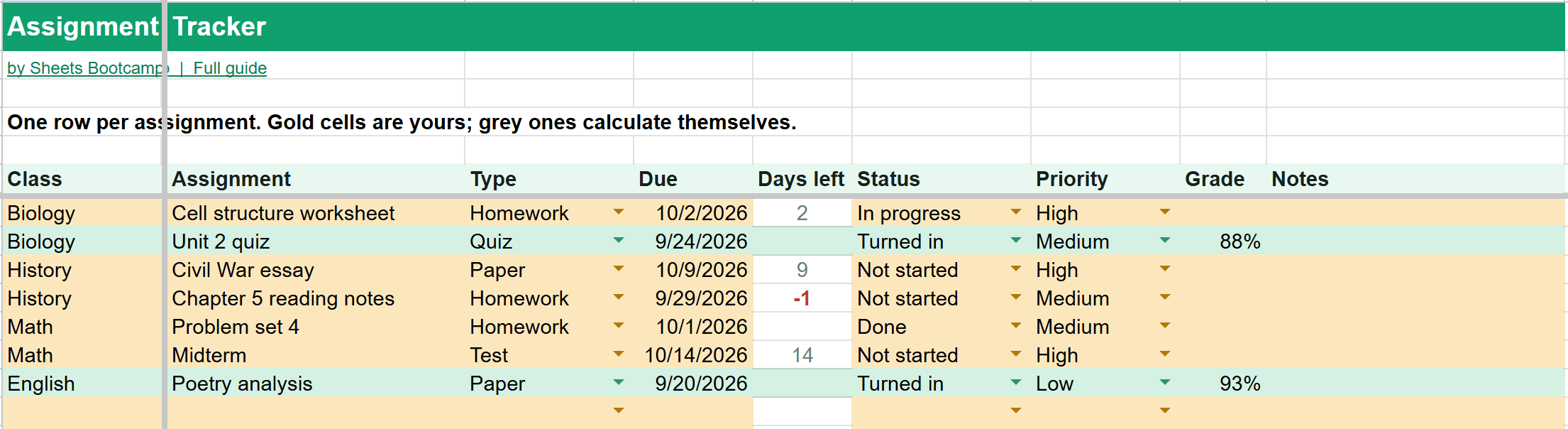
The Assignments tab holds one row per assignment:
- Class and Assignment name
- Type: homework, quiz, test, project, paper or lab
- Due date
- Days left, calculated from today. Negative numbers are overdue and show in red.
- Status: not started, in progress, done or turned in
- Priority: high, medium or low
- Grade, as a percent once it’s back
- Notes
When an assignment is Done or Turned in, its days left goes blank so it stops looking urgent. Turned-in work turns green.
The Summary
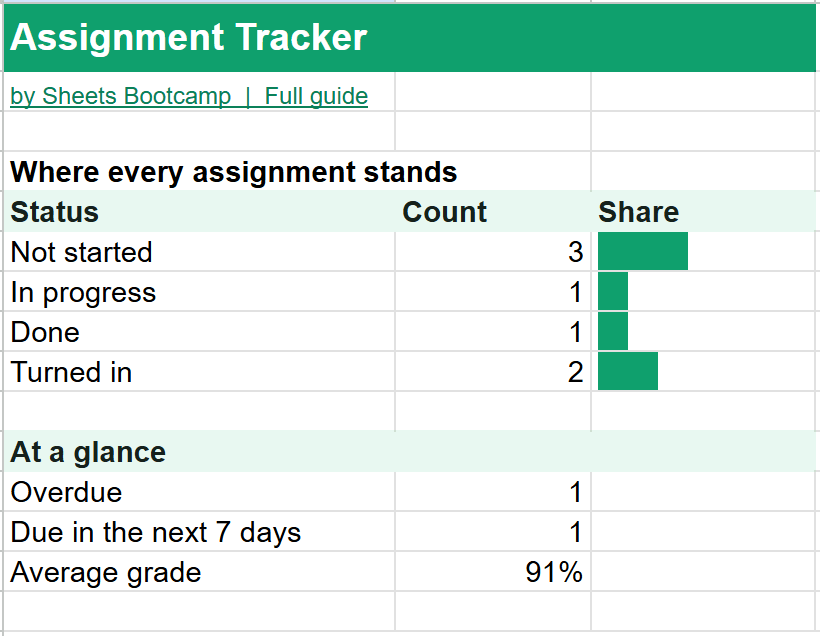
The Summary counts assignments by status and adds three numbers worth checking every day:
- Overdue: assignments past their due date that aren’t done. One in the example: reading notes due yesterday.
- Due in the next 7 days: what to plan the week around.
- Average grade: the average of every graded assignment. In the example, 88% and 93% average to 91%. Ungraded work doesn’t count as a zero.
How to Use It
- Make a copy with the button above.
- Enter every assignment from your syllabi at the start of the term, due dates included.
- Update the status as you work. It takes two clicks.
- Type grades as they come back.
Tip
Sort by Days left to put the most urgent work at the top. See how to sort in Google Sheets. To see a single class, use a filter on the Class column.
The Formulas Inside
The How it works tab explains every formula. Days left is the due date minus today, left blank for finished work:
Formula
=IF(OR(D7="",F7="Done",F7="Turned in"),"",D7-TODAY()) The Summary uses COUNTIFS to count assignments with days left between 0 and 7, and AVERAGE to average the grades. See COUNTIF and COUNTIFS and AVERAGE to learn how they work.
Frequently Asked Questions
Is this Google Sheets assignment tracker free?
Yes. It's free with no email or sign-up. Press Make a copy and it goes into your own Google Drive.
How does it show overdue assignments?
Days left is the due date minus today. A negative number means the assignment is overdue, and it shows in red. The Summary counts how many are overdue and how many are due in the next 7 days.
What happens when I finish an assignment?
Set its status to Done or Turned in. Its Days left goes blank so it stops counting as overdue, and Turned in rows turn green.
Can I track grades?
Yes. Type each grade as a percent in the Grade column. The Summary shows the average of every graded assignment and skips the ones without a grade yet.
Can I use it for more than one class?
Yes. Every row has a Class column, so all your classes live in one list. Sort or filter by class to see one at a time.
You've googled this formula before. Probably more than once.
The Bootcamp is a real Google Sheet that grades every formula the moment you press Enter. 193 exercises across 9 modules, the 10% of Sheets that does 90% of the work. One payment of $29.
Get It for $29 Get the Bootcamp for $2930-day refund. Reply to any email and you get your money back.
Not ready to pay? Try Basic Training free →