
This free Google Sheets college application tracker keeps every school on one row with its plan, deadline, days left, status, fee, essays, recommendations and net price. A Summary tab counts applications by status, totals your fees, and shows your next open deadline.
beginner 2 min read
Free College Application Tracker for Google Sheets
A free Google Sheets college application tracker: deadlines with days left, status for every school, fees, essays and recommendations, plus a summary.
SB
Sheets Bootcamp
September 30, 2026
Table of Contents
Quick Answer
Free College Application Tracker for Google Sheets
Deadlines with days left, status dropdowns, fees and a summary. Formulas only, no add-ons.
Make a copy of the College Application TrackerFree. No email, no sign-up. Google asks you to press "Make a copy", and the copy lives in your own Drive.
Want to build files like this yourself? The Sheets Bootcamp teaches every formula in it. Get the Bootcamp for $29
What’s Inside
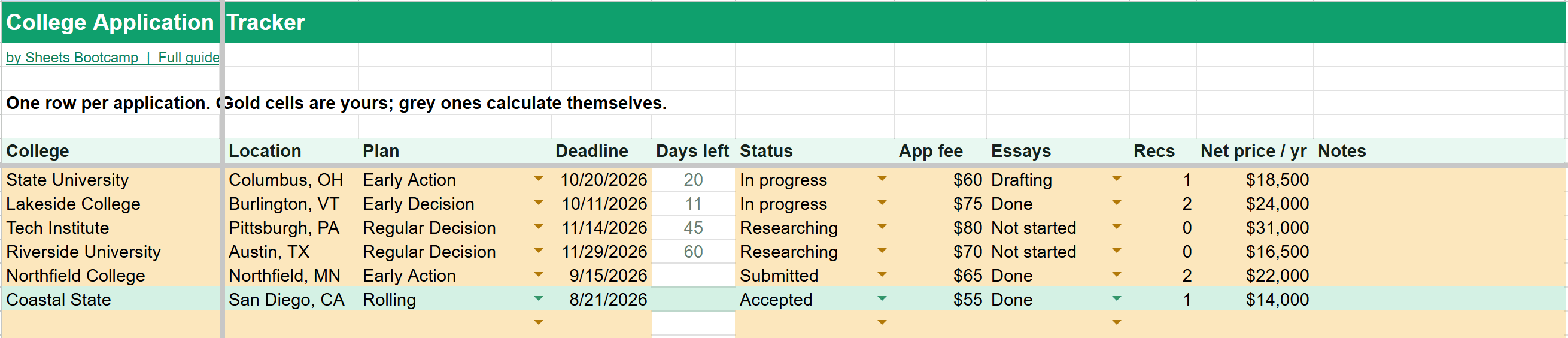
The Applications tab has one row per college:
| Column | What goes in it |
|---|---|
| College, Location | The school and where it is |
| Plan | Early Decision, Early Action, Regular Decision or Rolling |
| Deadline | The application deadline |
| Days left | Calculated: days until the deadline |
| Status | Researching, In progress, Submitted, Accepted, Waitlisted or Rejected |
| App fee | What the application costs |
| Essays | Not started, Drafting or Done |
| Recs | How many recommendation letters are in |
| Net price / yr | The yearly cost after aid, once you know it |
| Notes | Anything else |
Days left counts down to each deadline and goes blank once an application is submitted, so the list only nags you about what’s still open. An overdue deadline shows in red. Accepted schools turn green and rejections turn pink, so the list is readable at a glance.
The Summary
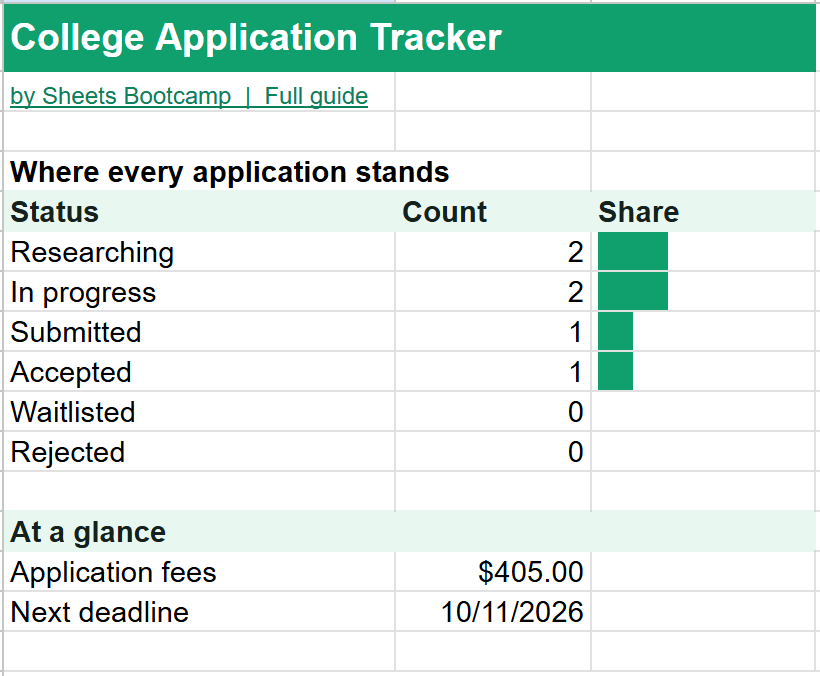
The Summary tab answers the three questions that come up most:
- Where does everything stand? A count for each status, with a bar.
- How much have I spent on applications? The total of every fee. In the example, $405 across six schools.
- What’s due next? The earliest deadline that’s still ahead and not yet submitted.
How to Use It
- Make a copy with the button above.
- Add every school you’re considering, even ones you’re still researching.
- Update the status from the dropdown as each application moves along.
- Check the Summary once a week to see what’s coming.
Tip
Add net price as soon as each financial aid letter arrives. Sorting by that column is the fastest way to compare offers side by side. See how to sort in Google Sheets.
The Formulas Inside
The How it works tab explains each formula in plain language. Days left subtracts today from the deadline, but only while the application is open:
Formula
=IF(OR(D7="",F7="Submitted",F7="Accepted",F7="Waitlisted",F7="Rejected"),"",D7-TODAY()) The next deadline uses MINIFS to find the earliest date that’s still ahead. To learn the pieces, see IF statements, COUNTIF and date functions.
Frequently Asked Questions
Is this college application tracker free?
Yes. It's free with no email or sign-up. Press Make a copy and it goes into your own Google Drive.
What does Days left show?
The number of days until each deadline, counting from today. It goes blank once an application is Submitted, Accepted, Waitlisted or Rejected, so only the ones still to do stand out.
Can I track Early Decision and Early Action separately?
Yes. The Plan column is a dropdown with Early Decision, Early Action, Regular Decision and Rolling.
How many colleges can I add?
Up to 200 rows, far more than any application list needs, so you can also keep schools you're only researching.
Can a parent or counselor see it?
Yes. Share your copy from the Share button in Google Sheets. Give view access if you only want them to read it.
You've googled this formula before. Probably more than once.
The Bootcamp is a real Google Sheet that grades every formula the moment you press Enter. 193 exercises across 9 modules, the 10% of Sheets that does 90% of the work. One payment of $29.
Get It for $29 Get the Bootcamp for $2930-day refund. Reply to any email and you get your money back.
Not ready to pay? Try Basic Training free →