
This free Google Sheets job application tracker keeps every application on one row with its status, days since you applied, next step and date, salary, contact and link. A Summary tab counts applications by status and calculates your interview rate.
beginner 2 min read
Free Job Application Tracker for Google Sheets
A free Google Sheets job application tracker: every application with status, days since you applied, next step and date, plus your interview rate.
SB
Sheets Bootcamp
September 30, 2026
Table of Contents
Quick Answer
Free Job Application Tracker for Google Sheets
Status, days since you applied, next steps and interview rate. Formulas only, no add-ons.
Make a copy of the Job Application TrackerFree. No email, no sign-up. Google asks you to press "Make a copy", and the copy lives in your own Drive.
Want to build files like this yourself? The Sheets Bootcamp teaches every formula in it. Get the Bootcamp for $29
What’s Inside

The Applications tab has one row per job:
| Column | What goes in it |
|---|---|
| Company, Role, Location | The job itself |
| Applied | The date you sent it |
| Days since | Calculated: how long ago you applied |
| Status | Wishlist, Applied, Interviewing, Offer, Rejected or Withdrawn |
| Next step, Next step date | What happens next, and when |
| Salary, Contact, Link, Notes | Everything you’ll want in the interview |
Offers turn green and rejections turn pink, so the list tells you where things stand before you read a word.
The Summary
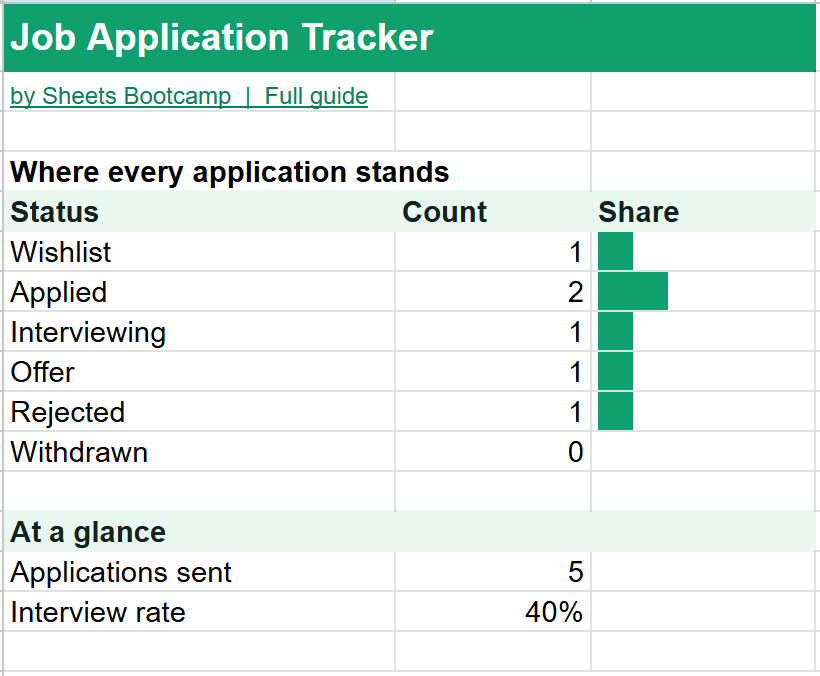
The Summary counts your applications by status and works out two numbers:
- Applications sent: every row with an Applied date. Wishlist jobs don’t count until you apply.
- Interview rate: applications that reached an interview or an offer, divided by applications sent. In the example, 2 of 5, or 40%.
A low interview rate usually points at the resume or the roles you’re choosing. A high rate with no offers points at interviews. Either way, the number tells you where to spend your time.
How to Use It
- Make a copy with the button above.
- Add jobs to the Wishlist as you find them, with the link.
- Fill in Applied when you send each one, and change the status to Applied.
- Log the next step and its date after every contact, so nothing slips.
Tip
Sort by Next step date each morning to see what needs doing today. See how to sort in Google Sheets.
The Formulas Inside
The How it works tab explains each formula. Days since is today minus the date you applied:
Formula
=IF(D7="","",TODAY()-D7) The interview rate combines COUNTIF and COUNTIFS:
Formula
=(COUNTIF(F7:F206,"Interviewing")+COUNTIF(F7:F206,"Offer"))/COUNTIFS(D7:D206,"<>") To learn how these work, see COUNTIF and COUNTIFS and percentages in Google Sheets.
Frequently Asked Questions
Is this job application tracker free?
Yes. It's free with no email or sign-up. Press Make a copy and it goes into your own Google Drive.
What statuses can I use?
Wishlist, Applied, Interviewing, Offer, Rejected and Withdrawn. Use Wishlist for jobs you plan to apply to, and leave the Applied date empty until you do.
How is the interview rate calculated?
Applications that reached Interviewing or Offer, divided by every application with an Applied date. In the example, 2 of 5 applications got that far, a 40% interview rate.
How do I know when to follow up?
Days since shows how long ago you applied. Sort by it, or add a follow-up as the Next step with a date.
How many applications can it hold?
200 rows, enough for a long search. Offers turn green and rejections turn pink so the list stays readable.
You've googled this formula before. Probably more than once.
The Bootcamp is a real Google Sheet that grades every formula the moment you press Enter. 193 exercises across 9 modules, the 10% of Sheets that does 90% of the work. One payment of $29.
Get It for $29 Get the Bootcamp for $2930-day refund. Reply to any email and you get your money back.
Not ready to pay? Try Basic Training free →