
This free Google Sheets pay stub template calculates gross pay from hours, rate, overtime and bonus, subtracts taxes and other deductions, and shows net pay with year-to-date totals for every line. Enter income tax as a rate or a fixed amount. Social Security (6.2%) and Medicare (1.45%) are prefilled and editable.
beginner 2 min read
Free Google Sheets Pay Stub Template
A free Google Sheets pay stub template: hours and overtime, gross pay, tax and other deductions, net pay, and year-to-date totals that calculate themselves.
SB
Sheets Bootcamp
September 30, 2026
Table of Contents
Quick Answer
Free Pay Stub for Google Sheets
Earnings, overtime, deductions, net pay and year to date on one page. Formulas only, no add-ons.
Make a copy of the Pay StubFree. No email, no sign-up. Google asks you to press "Make a copy", and the copy lives in your own Drive.
Want to build files like this yourself? The Sheets Bootcamp teaches every formula in it. Get the Bootcamp for $29
What’s Inside
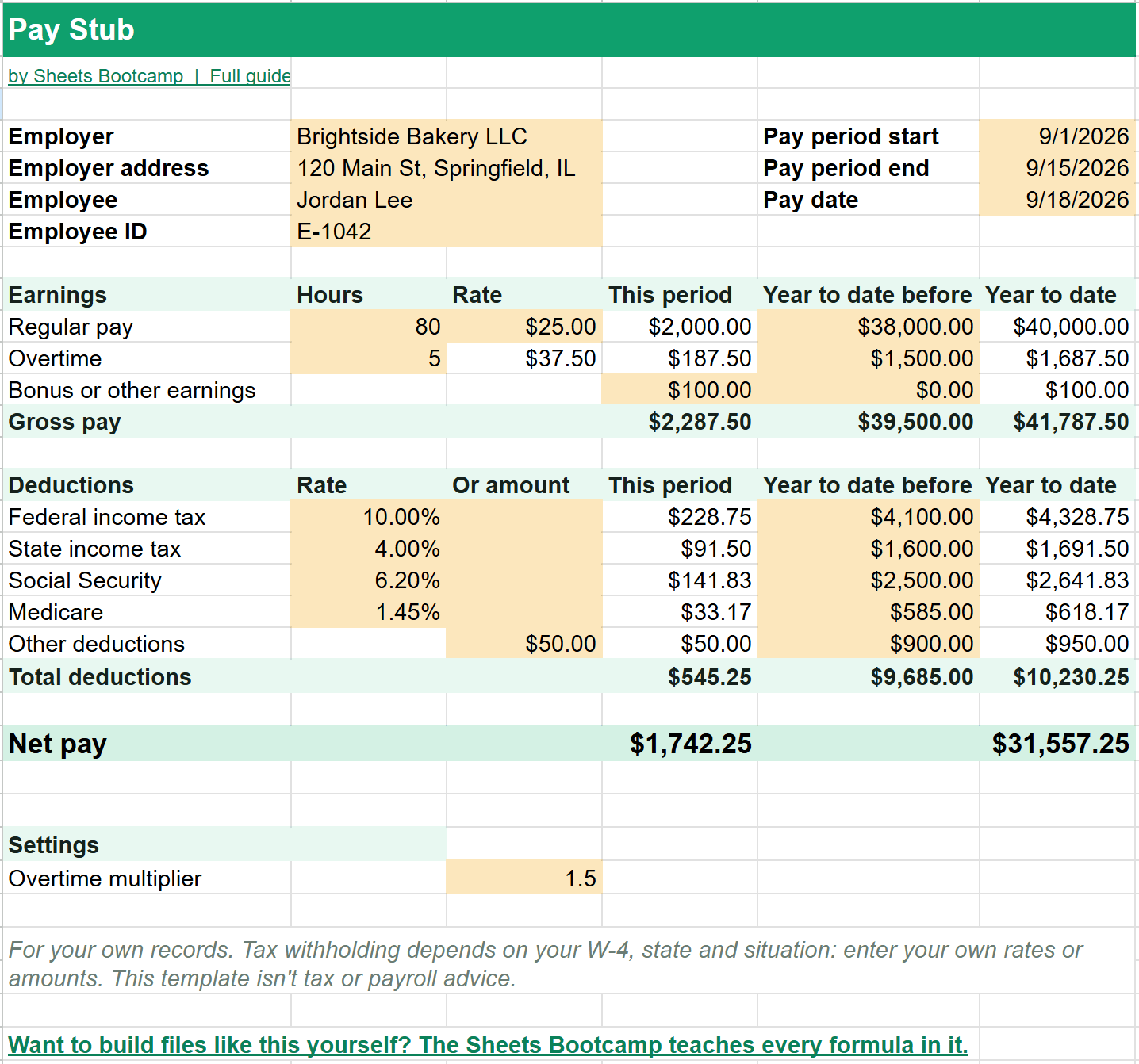
The stub has four parts:
- Details: employer, address, employee, employee ID, pay period and pay date.
- Earnings: regular hours times the rate, overtime hours at 1.5 times the rate, and a line for bonus or other earnings.
- Deductions: federal and state income tax, Social Security, Medicare and other deductions.
- Net pay: gross pay minus total deductions.
Every line has three money columns: This period, Year to date before, and Year to date, which adds the two.
A Worked Example
The example stub is for 80 regular hours at $25 plus 5 overtime hours:
| Line | Calculation | This period |
|---|---|---|
| Regular pay | 80 × $25.00 | $2,000.00 |
| Overtime | 5 × $37.50 | $187.50 |
| Bonus | $100.00 | |
| Gross pay | $2,287.50 | |
| Federal income tax | 10% | $228.75 |
| State income tax | 4% | $91.50 |
| Social Security | 6.2% | $141.83 |
| Medicare | 1.45% | $33.17 |
| Other deductions | fixed | $50.00 |
| Net pay | $1,742.25 |
Each deduction is rounded to the cent, the way a real stub is, so the lines always add up to the total.
Deductions: Rate or Amount
Each tax line has two gold cells: Rate and Or amount. Type a rate and the stub multiplies it by gross pay. Type an amount and that exact figure is used instead. That covers both a flat percentage and the exact withholding from a payroll system.
Warning
This template doesn’t work out income tax withholding for you. That depends on the W-4, the state and other details. Enter the figures you actually withhold, and check with a payroll provider or tax professional if you’re not sure. Social Security and Medicare start at the standard employee rates of 6.2% and 1.45%, and they’re editable too.
Making the Next Stub
- Right-click the Pay Stub tab and choose Duplicate.
- On the copy, paste the Year to date column into Year to date before, as values.
- Change the pay period, pay date and hours.
Each pay period gets its own tab, and the year-to-date figures carry forward.
The Formulas Inside
The How it works tab explains each formula. The deduction lines use the amount if you typed one, and otherwise rate times gross pay:
Formula
=IF(C16<>"",C16,ROUND($D$13*N(B16),2)) To learn the pieces, see IF statements, percentages and multiplying in Google Sheets.
Frequently Asked Questions
Is this Google Sheets pay stub template free?
Yes. It's free with no email or sign-up. Press Make a copy and it goes into your own Google Drive.
How does it calculate overtime?
Overtime pay is overtime hours times the regular rate times a multiplier, 1.5 by default. With a $25 rate, overtime pays $37.50 an hour. Change the multiplier in Settings for double time.
Does it calculate income tax for me?
No. Income tax withholding depends on the W-4, the state and other details, so you enter the rate or the exact amount. Social Security and Medicare start at the standard employee rates of 6.2% and 1.45%, which you can edit.
How do year-to-date totals work?
Each line adds this period to the year-to-date amount before it. For the next stub, duplicate the tab and paste the Year to date column into Year to date before.
Is this an official pay stub?
It's a record-keeping template, not payroll or tax advice. Check withholding with your payroll provider or a tax professional.
You've googled this formula before. Probably more than once.
The Bootcamp is a real Google Sheet that grades every formula the moment you press Enter. 193 exercises across 9 modules, the 10% of Sheets that does 90% of the work. One payment of $29.
Get It for $29 Get the Bootcamp for $2930-day refund. Reply to any email and you get your money back.
Not ready to pay? Try Basic Training free →